Mini Beast

Your printer, in your pocket. Pi optional.

See the print live, check the time left, change temperatures, pause it, stop it or send the next file, all from your phone. Mini Beast works with most popular printers. Run the bridge on a Raspberry Pi or in Docker if you have one, or on your computer or an old phone in a drawer if you don't.

$3.99 a month after the beta, or included with MakerBeast.
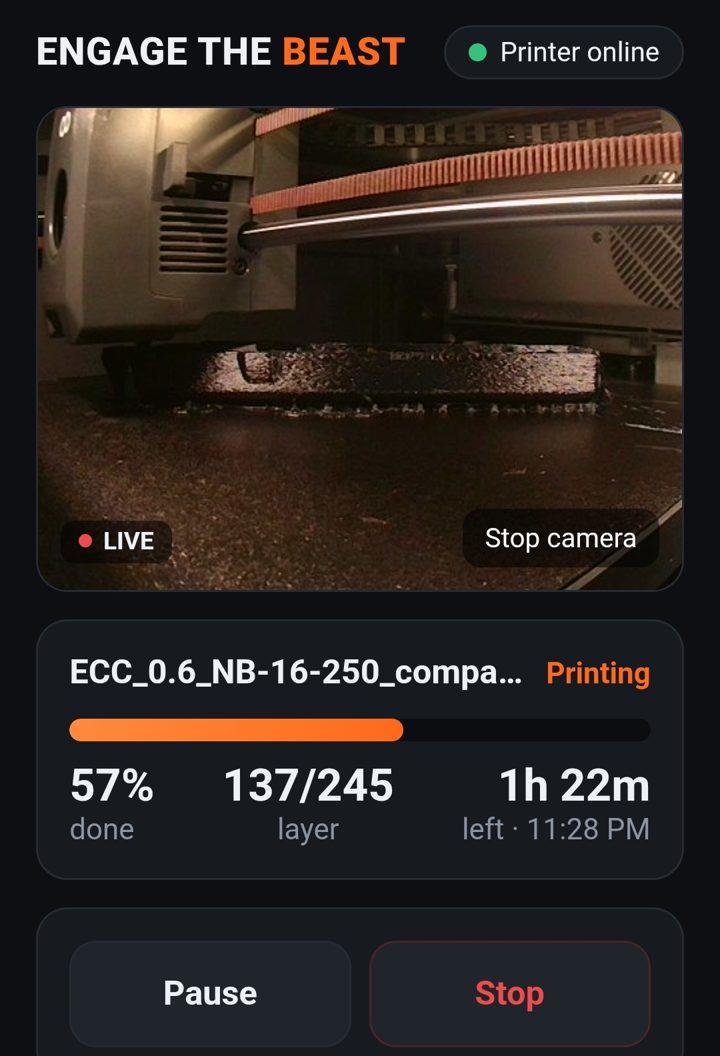
Mini Beast on a phone: live camera of a Centauri Carbon printing, 57% done, layer 137 of 245, 1 hour 22 minutes left
Real screenshot. 57% done, 1 h 22 m left, finishing at 11:28 PM.
How it works

Three steps, about five minutes.

1. Start Beast Bridge

Double-click it on Windows (it installs what it needs), or run it on a Mac, a Linux box, a Raspberry Pi, in Docker, or on an old Android phone. It finds the printers on your Wi-Fi.

2. Open it on your phone

Type the address the bridge shows and its 6-digit PIN. Only phones with the PIN get in.

3. Add it to your home screen

It opens like an app from then on. iPhone: Share, then Add to Home Screen. Android: menu, then Add to Home screen.

What you can do

Everything you get up to walk over and check.

  • Live camera. The bridge holds one stream and shares it, so printers that allow a single viewer keep working.
  • Progress, layer, time left and finish time. Alerts when a print finishes, pauses or errors.
  • Tap to set nozzle and bed. Steps of 5 or 10, or presets for PLA, PETG, ABS/ASA, PA-CF and TPU. Each printer's limits are enforced.
  • Pause, resume and stop. Stop always asks first.
  • Send a print. Pick a sliced file on your phone; it can start as soon as it arrives.
  • Start files already on the printer.
  • Speed modes and the light, on printers that have them.
  • Several printers, one bridge, with a picker at the top of the screen.
Printers

Works with the printers people actually own.

Bambu LabX1, X1C, X1E, P1P, P1S, P2S, A1, A1 mini, H2DControl needs LAN-only Mode and Developer Mode on the printer (Bambu's rule), which turns off the Bambu Handy app.
CrealityK1 family, K2 family, Hi, Ender 3 V3 and V3 KE, stock firmwareK2 camera view is coming.
ElegooCentauri Carbon. Neptune 4 series through Klipper.
PrusaMK4 and MK4S, Core One, XL, MINI+, MK3.9 through PrusaLinkNo remote temperature setting on PrusaLink.
FlashforgeAdventurer 5M, 5M Pro, AD5X
Klipper and OctoPrintSovol, Qidi, Voron, Anycubic with Rinkhals, and any USB printer on OctoPrint

Coming: Anycubic on stock firmware and the Centauri Carbon 2. During the beta, each driver gets confirmed on real printers by testers who own them.

No Pi? No problem.

Got an old phone in a drawer? That's your print server.

A Raspberry Pi or a Docker box works great if you have one. If you don't, an old Android phone does the same job. It doesn't even need a SIM card, just your Wi-Fi. It sits next to the printer, runs on its charger, and can double as a camera for printers that don't have one. It can even run OctoPrint for older USB printers.

What you need

  • An Android phone from about 2017 or newer
  • The free Termux app (from F-Droid)
  • Battery saving turned off for Termux, and a charger. If the phone has an 80% charge limit, turn it on.

iPhones can't run background servers, so this one is Android only.

For Elegoo owners

Built first on a Centauri Carbon.

Elegoo owners have had few choices: Elegoo's own app covers the Centauri Carbon 2 and newer, and most other remote options mean setting up a Raspberry Pi or Docker. Mini Beast was built and proven on an original Centauri Carbon, where the live camera, progress and temperature controls were confirmed from a phone. A Pi or Docker stays optional.

Away from home

Check the print from work, privately.

Your printer and phone talk to the bridge on your own Wi-Fi, behind a PIN. When you want to look from somewhere else, the bridge can open a private link that you switch off again when you're done. The beta link changes each time; permanent links come with the paid version.

Free beta

Get Mini Beast free while it's in beta.

Tell us what you print on and we'll send you the download and setup steps.

Questions

Mini Beast questions

Is Mini Beast in the App Store or Google Play?

Not needed. It opens in your phone's browser and you add it to the home screen, where it works like an app. Nothing to install from a store.

Do I need a Raspberry Pi or Docker?

You can use either, but you don't need them. The bridge also runs on the computer you have, or on an old Android phone with no SIM card over Wi-Fi. It only needs Python, and on Windows it installs that for you.

Is it safe to control my printer from my phone?

Only phones with your 6-digit PIN can get in, and too many wrong tries locks out that device for a while. Stop always asks to confirm, and temperatures can't be set past the printer's limits.

What does it cost?

Free during the beta. After that, Mini Beast is $3.99 a month, and it's included in every MakerBeast plan.