MakerBeast for 3D printing

Snap a photo of the part. Print the replacement.

Updated

Broken clip, lost knob, missing bracket? Take a few photos with a ruler beside it and MakerBeast turns them into a printable part. Then fix it in plain English: "make the hole 6 mm." It also watches your printer from your phone, finds why a print failed and gives you settings you can trust.

Just your email. No card, no download. During the beta every account gets all of MakerBeast Pro free through Dec 31.

Works with Bambu Lab, Creality, Elegoo, Prusa, Flashforge, Klipper and OctoPrint printers.
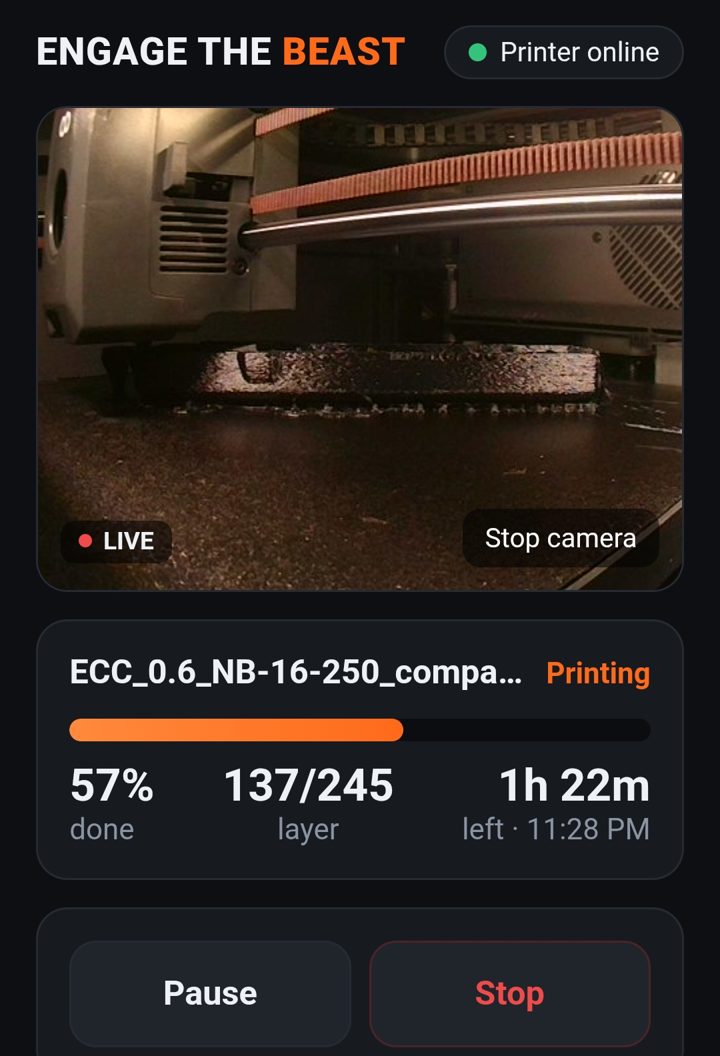
MakerBeast on a phone: live camera of a Centauri Carbon printing, 57% done, layer 137 of 245, 1 hour 22 minutes left, with Pause and Stop buttons
Real screenshot. A Centauri Carbon mid-print, watched from the couch.
MakerBeast · on your phone

See it, stop it, heat it, send it. From anywhere in the house or out of it.

A small program called Beast Bridge talks to your printer over your own Wi-Fi. It runs on a Raspberry Pi or in Docker if you already have one, but you don't need either: your computer works, and so does an old Android phone with no SIM card. Your phone opens MakerBeast like an app from the home screen, and there's nothing to flash on the printer.

Live camera

The bridge opens one camera stream and shares it with every phone that's watching, so printers that allow only one viewer keep working.

Progress you can trust

Percent, layer, time left and the clock time it finishes. Alerts when it finishes, pauses or throws an error.

Tap to set temperatures

Nozzle and bed, in steps of 5 or 10, or one tap for PLA, PETG, ABS/ASA, PA-CF or TPU. The printer's own limits are enforced.

PETG preset → 240° / 70°

Pause, resume, stop

Stop asks first. Speed modes and the chamber light where the printer has them.

Send the next print

Pick a sliced file on your phone and it goes to the printer, starting as soon as it arrives if you want.

Every printer in one place

One bridge runs every printer you own, any mix of brands. The All printers screen shows them together, with the ones that need you on top, and every alert says which printer it is.

Idea from a maker

Got an old phone in a drawer? That's your print server.

No Pi? No problem. An old Android phone with no SIM card runs Beast Bridge on Wi-Fi, so it doesn't need a phone plan, and can double as a camera for printers that don't have one. iPhones can't run background servers, so this one is Android only.

From the founder's own printer

"Way better than Octo."

Jeff, who built Engage The Beast, after switching his own Centauri Carbon over from the Octo app he used before. The screenshot at the top is from that printer.

More about the phone app

Printers

Works with the printers people actually own.

Beast Bridge has a driver for each brand's own local connection. Setup searches your network, finds the printer and asks only for the code that brand needs.

Bambu LabX1, X1C, X1E, P1P, P1S, P2S, A1, A1 mini, H2DPhoto to part, slicing, Failure Finder and settings work with any Bambu, nothing to change. The phone app watches a Bambu left as it is (progress, time left, temperatures); its camera and controls need LAN-only Mode and Developer Mode (Bambu's rule).
CrealityK1, K1C, K1 Max, K1 SE, K2, K2 Plus, K2 Pro, Hi, Ender 3 V3 and V3 KE, on stock firmware with no rootingThe K2 family shows status and controls; its camera isn't shown in MakerBeast.
ElegooCentauri Carbon. Neptune 4 series through Klipper.
PrusaMK4 and MK4S, Core One, XL, MINI+, MK3.9 through PrusaLinkPrusaLink doesn't allow setting temperatures remotely.
FlashforgeAdventurer 5M, 5M Pro, AD5X, Creator 5 / 5 Pro
KlipperSovol SV06 Ace, SV07, SV08, Qidi, Voron and other Klipper machines, and Anycubic Kobra with Rinkhals firmware
Anything on OctoPrintOlder USB printers like the classic Ender 3 or a Prusa MK3, on a Raspberry Pi or an old Android phone

Not on the list? Every MakerBeast tool on the bench below works with any printer OrcaSlicer supports, and you can tell us your model when you join the beta.

MakerBeast · on the bench

From "why did that fail?" to a part that fits.

MakerBeast runs in your browser on a computer, tablet or phone. Every tool below works today, free to start. Founding members get every new tool as it lands.

Available now

Failure Finder

Pick what you see, add photos, drop in the G-code. It reads what your printer was actually told to do, then names the one cause behind it.

"Corners lift and it goes soft at layer 488"

Available now

Settings you can trust

Numbers from your filament maker's own profile, checked against your printer, nozzle and dryer, then exported to OrcaSlicer, Bambu Studio or PrusaSlicer.

Available now

CAD Studio and Fit Check

Describe a part in plain words and get a printable model. Print one test piece and holes come out the size you drew them.

Available now

Slice and print in the browser

OrcaSlicer's own engine with every one of its printer, filament and process presets, 1,042 printers in all. Slice right in your browser, sort a whole project onto as many build plates as it takes, then send it straight to your printer through Beast Bridge.

Available now

Paint colors for multi-color prints

Brush or fill up to 32 colors right onto any model, each with its own filament. MakerBeast works out the purge for every color change and shows the grams of each color before you print.

Available now

Beast Tune

Guided calibration for each filament on your own printer: temperature, flow, pressure advance, retraction and max speed. Tap the best section of each test print and your own preset builds itself. Optional, never forced.

Available now

Maintenance

What's due by print hours, from washing the plate to oiling the rods, with step-by-step how-tos, a calendar file and a sheet to print for the notebook by your printer.

Available now

Beginner guide

A "?" button on every screen walks newcomers through it step by step. Pros switch the tips off and the button stays out of the way.

Available now

CAD from a photo

Snap up to 8 photos of the part with a ruler beside it, type two or three measurements, and get a printable part you can change in plain English. Free printable photo ruler.

Available now

CAD from a pencil sketch

Draw the part on paper or right on the screen and write the sizes on it. It reads your numbers back so you can fix any it got wrong, then builds the part. Best on brackets, spacers, knobs and mounts. Free printable sketch sheet.

Available now

3D scans

Drop in a scan from Polycam, KIRI, Scaniverse, Creality or Revopoint. It shrinks it, fixes holes and stray bits on your device, and can rebuild it as editable CAD.

Available now · Pro

Expert CAD mode

Real CAD for detailed work: feature history, sketches with dimensions and constraints, parameters, fillets, shells, holes and patterns, with STEP in and out for FreeCAD, Fusion and Onshape. Part of MakerBeast Pro. On the MakerBeast plan you get one free 7-day try-out.

Everything in MakerBeast

Pricing

Less than a spool of filament a month.

During the beta, every account gets everything in MakerBeast Pro free through Dec 31.
Every AI tool at Pro limits, the phone app, up to 10 printers. Just your email, no card. After Dec 31 you pick a plan below, or stay on Free.
Start free

Paid plans include the phone app. The G-code checker, printer checks, Fit Check, voice, journal, spool tracker and failure library are free and unlimited on every plan; plans set how many AI answers you get each month.

Free$0

Try the MakerBeast tools.

  • 3 failure diagnoses
  • 3 settings profiles
  • 2 CAD parts
  • 15 questions
  • 6 Beast Tune photo picks
  • Slicing, color painting and every free tool
  • Phone app: with MakerBeast or Pro
Start free
MakerBeast · most popular$14.99 /month

Your printer on your phone, plus the workbench.

  • Phone app: camera, alerts, pause, send prints
  • 40 failure diagnoses
  • 30 settings profiles
  • 25 CAD parts
  • 300 questions
  • 40 Beast Tune photo picks
  • 50 hours of Spaghetti watch (AI catches failed prints)
  • Up to 3 printers
  • New tools as they launch
Choose MakerBeast
MakerBeast Pro$29.99 /month

For print farms and makers who sell.

  • 150 failure diagnoses
  • 100 settings profiles
  • 100 CAD parts
  • 1,000 questions
  • 150 Beast Tune photo picks
  • 200 hours of Spaghetti watch
  • Up to 10 printers, commercial use
  • Expert CAD mode
Choose MakerBeast Pro
Founding members: MakerBeast for $99 a year.
For the first 100 people. The price stays as long as you stay subscribed. Nothing to pay until the beta ends on Dec 31.
Save my spot

For comparison, failure-diagnosis apps and AI CAD apps each charge about $8–10 a month on their own, and most remote-monitoring add-ons need a Raspberry Pi. MakerBeast can use one, but doesn't have to.

Phone app beta

Want your printer on your phone too?

You don't need this to make parts: photo to part, slicing, Failure Finder and settings all run in your browser. The phone app needs a small program, Beast Bridge, on a computer or an old Android phone on your Wi-Fi. Tell us your printer and we'll email the setup steps for it. You're signed in right away, with all of MakerBeast Pro free through Dec 31.

Questions

Before you sign up

Do I have to install anything?

No. Photo to part, slicing, Failure Finder, settings and the Guru all run in your browser on a computer, tablet or phone. Only the phone app, which watches and controls your printer, needs Beast Bridge on a computer or an old Android phone on your Wi-Fi.

Do I need a Raspberry Pi or Docker?

You can use either, but you don't need them. Beast Bridge also runs on the Windows, Mac or Linux computer you already have, or on an old Android phone. The phone doesn't even need a SIM card, just your Wi-Fi. The phone app itself opens in your phone's browser and installs to the home screen like an app.

Does my print data go to the cloud?

No. The bridge talks to your printer over your own Wi-Fi and your phone talks to the bridge, protected by a 6-digit PIN. Watching from away from home is optional and uses a private link you turn on and off.

Will it work with my printer?

Photo to part, slicing, Failure Finder and settings work with any printer OrcaSlicer supports, 1,042 of them. For the phone app, see the printer list above; A Bambu can be watched as it is; its camera and controls need LAN-only Mode and Developer Mode turned on. If yours isn't listed, join the phone app beta and tell us the model.

Do I have to calibrate every filament?

No. MakerBeast includes all of OrcaSlicer's printer, filament and process presets, and those are the default. Beast Tune is there when you want better prints, never forced.

What can I use today?

The MakerBeast tools marked "available now" work today, free to start. The phone app is in a free beta. CAD from a photo, slicing in the browser, color painting for multi-color prints, Beast Tune calibration, the maintenance schedule, the beginner guide, 3D scan import and Expert CAD (Pro) all work today. The phone app works with the printers listed above.

Can I cancel?

Any time, from the Billing button in the app. You keep your plan until the end of the month you paid for.